Friday, March 29, 2013


Monday, February 25, 2013
What would you tell your 25 year-old self?
My career is working with emerging technologies, my passion is proving that women can do anything they put their mind to. Whether your mission is to be at home raising the kids full-time, working full-time, starting your own business, or some combination of all of these things, conquering the world takes a solid support system. I have been fortunate throughout my career to have found and attached myself to some pretty powerful mentors. They have helped me through career transitions, life changes, self doubt, and kicked me in the pants when I needed it most. As an executive in a fast growing mobile technology firm I now find myself in the position of influencing others, which is a huge responsibility. I have started a group specifically for the women in my company to provide a source of mentorship, education, and support as they too travel professional and personal roads that I have traveled. These are amazing women at all stages in their life. I am sharing my experiences and lessons learned but I'd like to enlist the wisdom from my powerhouse female network and share some of your perspectives with the group. My question is simple - based on what you know now, what career & life advice would you give your 25 year old self? I'd ask that you respond with 3 pieces of advice that I can share with the women at Solstice Mobile. You can add your thoughts in the blog comments below. I will be consolidating responses and presenting it at our March 21st meeting. In exchange for your time & feedback, I'd also be happy to share a copy of the consolidated responses with you.
Thank you for your time and for helping me make a difference.
-Kelly
kmanthey@solstice-mobile.com
kmanthey@solstice-mobile.com
Thursday, December 20, 2012
Another Great QR Code Use
I haven't seen stunning execution of a QR code campaign so I like to point out good uses when I do see them. Here's one I recently encountered at Chicago Midway Airport. They use the QR code to solve the age old problem of forgetting where you parked.

Wednesday, December 5, 2012
Dear Southwest Airlines....
Why did I have to print a paper boarding pass to checkin at the ticket counter? I use your app, just let me use a QR code from my app.
Why am I still carrying that paper boarding pass to the the gate? Let me scan a QR code from your app at the gate.
Thank you for the birthday drink coupons, it was so thoughtful. But don't give me more paper to keep track of. I have 2 kids that love mail & I just moved so maybe you don't have my new address. Why not just give me coupons in the app you know I downloaded & use? Better yet, give me drink passes in my passbook. My southwest card should be in passbook too.
How about sending me a push notification when it's nearing boarding time? I don't always find a seat at the gate, I'm usually looking for a plug for my iPhone.
Thanks for listening Southwest. Your competition are doing some of these things already so it's time to catch up. If you want more advice or need help building your mobile features, just call me. I know some great people.
Sincerely,
Kelly Manthey

Why am I still carrying that paper boarding pass to the the gate? Let me scan a QR code from your app at the gate.
Thank you for the birthday drink coupons, it was so thoughtful. But don't give me more paper to keep track of. I have 2 kids that love mail & I just moved so maybe you don't have my new address. Why not just give me coupons in the app you know I downloaded & use? Better yet, give me drink passes in my passbook. My southwest card should be in passbook too.
How about sending me a push notification when it's nearing boarding time? I don't always find a seat at the gate, I'm usually looking for a plug for my iPhone.
Thanks for listening Southwest. Your competition are doing some of these things already so it's time to catch up. If you want more advice or need help building your mobile features, just call me. I know some great people.
Sincerely,
Kelly Manthey
Sunday, September 9, 2012
The QR Code Mystery..... Solved!
I have finally encountered a really useful & practical placement for a QR code. Final results reported instantly! Where have you encountered serendipity with a QR code? 
Monday, August 13, 2012
Don't Let Android Fragmentation Get You Down
If you have decided to build an Android app the task of deciding which OS version to support and which devices to support can be daunting. Here are some tips to help you sort through the sea of variables that exist and help you focus on what really matters.
Understand OS Adoption Rates:
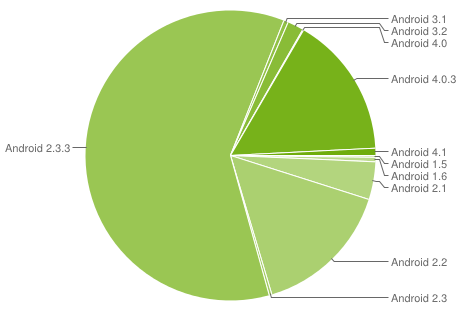
First, check the stats for Android OS adoption. There is a great Android dashboard that gives the top OS version hitting the Google play store for that 14-day period. At the time of this blog, the Gingerbread 2.3.3 version has a little over 60% of the Android market share.


Unfortunately, knowing the device maker is only half the battle. The models and features of each model can vary greatly. Getting down to the model level will help further refine your efforts.

Understand OS Adoption Rates:
First, check the stats for Android OS adoption. There is a great Android dashboard that gives the top OS version hitting the Google play store for that 14-day period. At the time of this blog, the Gingerbread 2.3.3 version has a little over 60% of the Android market share.
Understand the Device Market:
A recent study done by OpenSignalMaps did a great job of visualizing the Android device market fragmentation. This information can quickly help narrow the devices to tailor your development and testing efforts.
Samsung and HTC are big players but the market share division gets ugly quickly.

Unfortunately, knowing the device maker is only half the battle. The models and features of each model can vary greatly. Getting down to the model level will help further refine your efforts.

Get the Right Testing Tools:
Purchasing physical devices to physically test your app on is ideal. But it gets costly and can be difficult to scale. To get breadth of testing, consider enlisting the support of testing tools and services such as DeviceAnywhere or Perfecto Mobile. These services offer enterprise scale access to thousands of devices and OS versions. This affords the ability to quickly test out how a feature performs and trouble shoot specific user issues.
Capture App User Feedback:
The app store ratings is not where you want to first surface any issues with your app. To keep negative user reviews at bay, consider adding an in-app feedback mechanism. This provides your users the opportunity to give candid feedback during the in-app experience and keeps the negative reviews out of the public eye. Tools like OpinonLab give the customer a voice and help feed your product backlog as well as identify trends across user experience.
Reassess Everything Quarterly:
As with anything in the mobile space, things change quickly. Use the tools and information out there to reassess where the Android market is and where you should be focused.
What are the strategies your company is using to keep pace with the demands of the Android market?
Friday, April 6, 2012
Why Your Business Needs a Mobile Website
While we anecdotally know that people are using smartphones more than ever these days there is real data that supports it. Studies have predicted that by 2014, more
people will use mobile phones than PCs to get online. If your business is
just starting to develop a mobile strategy or if you are debating where to
spend resources in your current strategy, here are some compelling reasons to
continue to invest in the mobile web.
People search on mobile web, not in the app
store.
 We don't go to the app store looking for
information. We go there to find something specific- a game, a
productivity tool, a mobile version of a service we are already using offline
or in the desktop world. We go to our browsers to do research and gather
information. That coupled with our new behaviors means that people are more
likely to be looking for your products and services on a mobile browser.
We don't go to the app store looking for
information. We go there to find something specific- a game, a
productivity tool, a mobile version of a service we are already using offline
or in the desktop world. We go to our browsers to do research and gather
information. That coupled with our new behaviors means that people are more
likely to be looking for your products and services on a mobile browser.
If you have a mobile website, your site search
feature should be considered one of the most if not THE most important feature.
It must be fast, contextual, and simple to use. Here are some interesting
stats from a 2011mobile search study:
- People used mobile search at home in the evening (81%) than any other time or places more frequently than anywhere else (81%), followed by at home on weekends (80%).
- 66% use mobile search while while watching TV, something which should get advertisers thinking, while 61% said they use it at work.
- 75% said mobile search makes their lives easier, 63% said access to mobile search has changed the way they gather information, and 32% said they use mobile search more than search engines on their computers.
- 84% use mobile search to look for information on local retailers, such as opening hours, address and contact details. 82% look for online retailers, 73% find a specific product or manufacturer website.
- Something which ties in with the crossover in TV viewing and mobile search is that 71% learn more about a product or service having seen an ad, 68% use it to find the best price for a product.
Consumer behaviors
have changed.
We are always on our phones. When we have
downtime, when we are in the middle of another activity, first thing in the
morning, last thing before we fall asleep. With 66% of people using their
smartphones while watching TV coupled with the results from an Internet
Retailer study about what people are buying from their mobile devices (see
below), you could have some pretty compelling conversion rates between TV
advertising and purchases.

A
recent survey of 1,500 US adults at the 2011 Internet Retailer Conference Exhibition revealed
mobile shoppers’ most common purchases broken down by percentage:
•
16% bought apparel
•
15% bought food and beverages
•
11% bought toys and games
•
8% bought home goods
•
4% bought sporting goods
•
3% bought jewelry
•
8% bought all other product
Our fancy phones have also made us lazy.
We are more likely to make a purchase using the device already in our
pocket than taking the effort involved to go to and boot up our desktop
computer. I can honestly say that I've made more mobile purchases in the
last 6 months than from my desktop computer. My drivers for mobile
purchases are time & convenience. With a 3 yr. old, a newborn, and a
full-time career, the best time for me to shop is whenever I can steal a few
minutes during my busy day - waiting in line, my train commute, in bed...
If you don't have a mobile site, or if your
site is less than desirable, you will probably loose a potential customer.
People are going to try to find you via a
mobile browser whether or not you are ready to be found. If you haven't put a
mobile web version of your site out there yet, your desktop site will be
rendered. While chances are the site will load (if your site is flash
based, forget reaching the millions of worldwide iPhone users) the user
experience will suffer. The mobile screen dimensions will require a lot
of pinching and zooming to make the basic functions of your site useable.
Statistics show that a potential customer is more likely to seek out
competitor with a mobile site than suffer through a poor mobile experience.
Similarly, if your existing mobile website is
difficult to use and slow, people will abandon it. Don't forget the best
practices of mobile design - keep it simple and task oriented, design
navigation for the thumb, keep the code lightweight and fast, use all the available
phone senses (i.e. GPS, the camera) to make search fast and rewarding.
What are some mobile websites that you frequently use?
Subscribe to:
Posts (Atom)